linux命名空间简介

本文最后更新于:2025年11月19日 下午

linux namespace提供了一种进程资源隔离的方法。是docker背后的技术原理。

简介

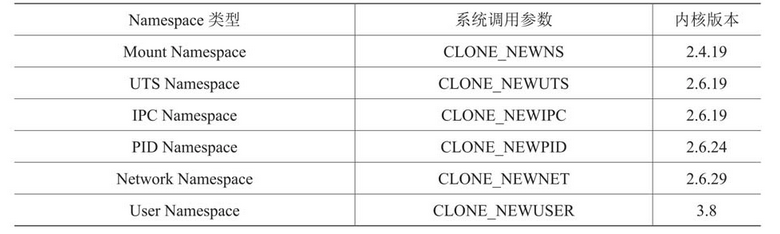
image.png

  • Mount Namespace - 挂载点隔离,一个空间的挂载卸载不影响另一个空间
  • UTS Namespace - 隔离nodename和domainname两个系统标识
  • IPC Namespace - 信号量,消息队列等IPC隔离
  • PID Namespace - pid 隔离
  • Network Namespace - 网络空间隔离
  • User Namespace - 用户、用户组隔离

从下面的输出也可以看到,现在的内核还执行time,cgroup等的隔离了。

查看进程的命名空间

ls -l /proc/{pid}/ns

1
2
3
4
5
6
7
8
9
10
11
12
$ ls -l /proc/self/ns        
Permissions Size User Group Date Modified Name
lrwxrwxrwx - leon leon 2025-03-28 15:39  cgroup -> cgroup:[4026531835]
lrwxrwxrwx - leon leon 2025-03-28 15:39  ipc -> ipc:[4026531839]
lrwxrwxrwx - leon leon 2025-03-28 15:39  mnt -> mnt:[4026531841]
lrwxrwxrwx - leon leon 2025-03-28 15:39  net -> net:[4026531840]
lrwxrwxrwx - leon leon 2025-03-28 15:39  pid -> pid:[4026531836]
lrwxrwxrwx - leon leon 2025-03-28 15:39  pid_for_children -> pid:[4026531836]
lrwxrwxrwx - leon leon 2025-03-28 15:39  time -> time:[4026531834]
lrwxrwxrwx - leon leon 2025-03-28 15:39  time_for_children -> time:[4026531834]
lrwxrwxrwx - leon leon 2025-03-28 15:39  user -> user:[4026531837]
lrwxrwxrwx - leon leon 2025-03-28 15:39  uts -> uts:[4026531838]

想判断两个进程是否在同一命令空间,比较上面的输出即可。
比较mininet(网络模拟工具)创建的进程和普通进程,发现mininet只在mnt和net上做了隔离。

创建不同命名空间的进程方法

函数
clone()函数,setns()函数,unshare()函数

命令
unshare

实验

pid隔离观察

观察隔离后的ps状态

(1) 创建一个pid,uts,mount隔离的bash

1
unshare -f -p -u -m /bin/bash

注意:需要-f(隔离后先fork)参数,不然起bash有异常,原因可参考 unshare –pid /bin/bash - fork cannot allocate memory

(2) 修改hostname,然后再拉一个bash,观察host变化为test了。但是外部主机的host却不会变化

1
2
3
root@ubuntusrv:~# hostname -b test
root@ubuntusrv:~# /bin/bash
root@test:~#

此时使用ps -ef观察pid,却还是能看到和外部相同的输出,看不出隔离效果?
因为ps,top等命令是读的/proc来获取的pid。目前的挂载沿用的外部主机的,所以看不出来效果。

(3)再次挂载/proc

1
root@test:~# mount -t proc proc /proc

这一步也可以通过命令行添加--mount-proc参数省略

(4)观察ps输出,此时看不到外面了。但是不影响外面的ps。

1
2
3
4
5
root@test:~# ps -ef
UID PID PPID C STIME TTY TIME CMD
root 1 0 0 08:29 pts/0 00:00:00 /bin/bash
root 9 1 0 08:29 pts/0 00:00:00 /bin/bash
root 20 9 0 08:30 pts/0 00:00:00 ps -ef

网络隔离

隔离网络,并让隔离的进程也能上外网。

(1) 创建一个pid,mount,uts,net隔离的bash运行环境,然后修改hostname

1
2
3
4
root@ubuntusrv:~# unshare -f -p -m -u -n --mount-proc /bin/bash
root@ubuntusrv:~# hostname -b test2
root@ubuntusrv:~# /bin/bash
root@test2:~#

(2) 观察网络接口,路由。

1
2
3
4
5
root@test2:~# ip addr
1: lo: <LOOPBACK> mtu 65536 qdisc noop state DOWN group default qlen 1000
link/loopback 00:00:00:00:00:00 brd 00:00:00:00:00:00
root@test2:~# ip r
root@test2:~#

网络接口只有lo,路由表为空

(3)在宿主机运行,添加一对网络接口,并配置宿主机这边的桥

1
2
3
4
5
6
7
root@ubuntusrv:~# ip link add veth0 type veth peer name veth1
root@ubuntusrv:~# ip link set veth0 up

root@ubuntusrv:~# brctl addbr br0
root@ubuntusrv:~# brctl addif br0 ens33
root@ubuntusrv:~# brctl addif br0 veth0
root@ubuntusrv:~# ifconfig br0 up

ens33是连接外部的物理网卡

(4)在宿主机运行 ps -ef | grep unshare,找到我们运行的unshare的pid

1
root        1452    1284  0 08:55 pts/0    00:00:00 unshare -f -p -m -u -n --mount-proc /bin/bash

(5)宿主机上运行,把veth1放到隔离的网络空间中并up起来

1
root@ubuntusrv:~# ip link set veth1 netns 1452 up

上面使用了pid

(6)隔离进程中运行,添加IP,路由

1
2
3
4
5
6
root@test2:~# ip addr add 192.168.10.99/24 dev veth1
root@test2:~# ip r add default via 192.168.10.1

root@test2:~# ping 223.5.5.5
PING 223.5.5.5 (223.5.5.5) 56(84) bytes of data.
64 bytes from 223.5.5.5: icmp_seq=1 ttl=115 time=7.56 ms

到这里就能够ping通了。但是ping域名ping不通。因为ubuntu24.04的resolv.conf指向自己127.0.0.1:53,网络隔离后,没有人监听53了。

(7)隔离进程中修改resolv.conf

1
2
3
4
5
6
7
8
9
10
11
root@test2:~# cp /etc/resolv.conf /tmp/
root@test2:~# mount --bind /tmp/resolv.conf /etc/resolv.conf
root@test2:~# vi /etc/resolv.conf
root@test2:~# cat /etc/resolv.conf
nameserver 223.5.5.5
options edns0 trust-ad
search localdomain

root@test2:~# ping www.qq.com
PING ins-r23tsuuf.ias.tencent-cloud.net (112.53.42.114) 56(84) bytes of data.
64 bytes from 112.53.42.114: icmp_seq=1 ttl=47 time=44.4 ms

我们先mount,避免修改到外部主机的内容。nameserver 改为223.5.5.5。然后就能够ping域名了。

cgroup隔离

内存限制实验,待完善

1
2
3
4
5
6
7
8
9
10
root@test2:~# mount -t cgroup2 none /sys/fs/cgroup
root@test2:~# mkdir /sys/fs/cgroup/limited
root@test2:~# echo $$ > /sys/fs/cgroup/limited/cgroup.procs
# 限制20M,单位字节
root@test2:~# echo 20000000 > /sys/fs/cgroup/limited/memory.max
# swap限制0
root@test2:~# echo 0 > /sys/fs/cgroup/limited/memory.swap.max
# 使用100M内存
root@test2:~# python3 -c 'a = " " * 100 * 1024 * 1024'
Killed

人生苦短,远离bug Leon, 2025-03-28

linux命名空间简介
https://leon0625.github.io/2025/03/28/4ffd7d75fdff/
作者
leon.liu
发布于
2025年3月28日
许可协议